

In the age of digital transformation, location-independent collaboration is becoming ever more crucial. It is not only important to have the right tools for editing documents, but to use suitable software that ensures optimal integration of various applications to streamline workflows.
Document management and Microsoft 365 – upgrade your virtual workstation
Microsoft Office and Microsoft 365 are the gold standard for every back office: from Microsoft Word, Excel, and PowerPoint, to Teams, Exchange, and Outlook, and even SharePoint and OneDrive Business. Companies that also integrate a document management system (DMS) or an enterprise content management (ECM) system into the Microsoft world benefit many times over. Using ECM functions within Microsoft applications offers many possibilities for optimizing collaboration both in teams and across departments.
Perfectly integrated: ELO and Microsoft 365
The right ECM system offers much more than just classic document management: As a powerful digitalization platform, ELO ECM Suite supports companies in digitalizing their business processes.
Combined with Microsoft 365, ELO ECM Suite transforms your workstation into a central business process platform, both on-premises and in the cloud, with extensive business applications.
For more information download now our flyer about ELO integration with Microsoft 365.
Microsoft Teams and ELO: Take your projects to the next level
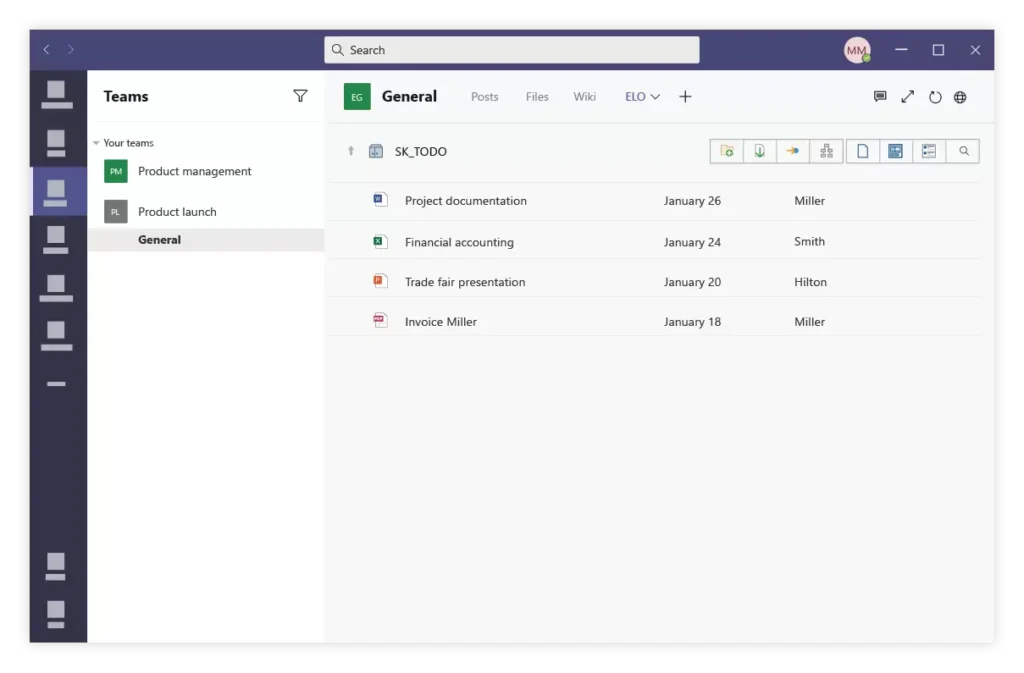
The ELO system is the central repository for your documents created in Microsoft 365. Seamless integration between ELO and Microsoft 365 optimizes collaboration throughout the company: For example, you can easily share documents or folders from ELO directly within Microsoft Teams. You also have the option to link entire folder structures from ELO in Teams, enabling external users without access to your ELO system to work on documents. This helps streamline your projects.
Efficient archiving
Digital archiving of your Microsoft documents in the ELO system ensures compliance, as well as a non-modifiable document history with automatic versioning. The current version of a document is available at all times and all changes are documented. A comprehensive permissions system keeps your data and documents safe.
Organize your Microsoft Outlook inbox
Microsoft Outlook is the central communication tool in almost every company. Countless e-mails arrive daily: Use ELO to get your mailbox under control. E-Mails and attachments are automatically filed and archived in a preconfigured location in ELO. And everything can be located quickly and easily using the search function. You can also send or forward e-mails directly, without switching between programs.
Server-based e-mail archiving
The e-mail management module ELO XC reduces the load on your Exchange mailboxes while meeting legal requirements for data retention – so your entire organization benefits. Automated, action- and server-based e-mail archiving ensures end-to-end transparency of all correspondence as well as compliance with relevant regulations. It also ensures fast availability of information from e-mails.
Your benefits when integrating software environments:
- ECM functions for your documents: From one central filing location to automatic versioning
- Enhanced collaboration: Direct access to documents while working with Microsoft applications and fast collaboration even for people without access to ELO
- Compliant business documents: Meet compliance requirements and control access with permissions concepts
- Efficient office management: With the right tools, you can ensure order in your back office – automatically, securely, and transparently

Ready for the digital future?
Optimize your processes with individual digitization strategies.
We’re here to help!